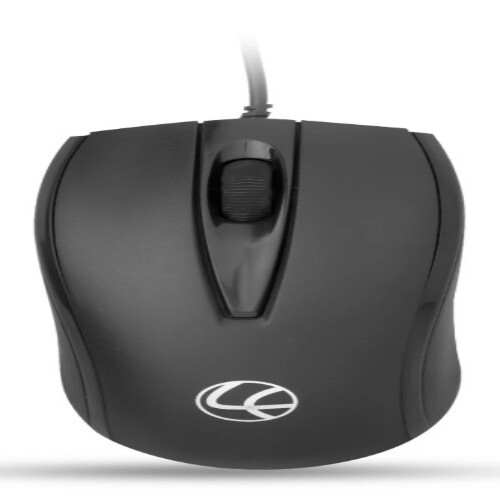
About Mouse Wired L-70 Lapcare
Warranty : 1 Year
Features :
Technical Specifications :
High Precision and Ergonomic ComfortThe L-70 Lapcare Mouse is engineered for accurate cursor control and user comfort. Its 1000 DPI resolution ensures pinpoint tracking, making it ideal for productivity and everyday activities. The ergonomic contours minimize hand fatigue during extended sessions, while the rubberized scroll wheel enhances grip and precision.
Hassle-Free Connectivity and CompatibilityWith plug & play support via a USB interface, the L-70 mouse eliminates the need for software installation. It seamlessly connects to desktops and laptops running on Windows, Mac, or Linux operating systems, delivering versatility for users in different environments.
Durable and Efficient ConstructionCrafted from robust ABS plastic, the L-70 is designed to withstand regular use. Its low power consumption operation makes it energy efficient, and the standard size fits most users comfortably. Whether for home, business, or school use, this mouse is built to last.
FAQ's of Mouse Wired L-70 Lapcare:
Q: How do I connect the Lapcare L-70 Wired Mouse to my computer?
A: You simply plug the USB cable into an available USB port on your desktop or laptop. No additional drivers or software are required, thanks to its plug & play feature.
Q: What operating systems are compatible with the L-70 Lapcare Mouse?
A: The mouse works seamlessly with Windows, Mac, and Linux operating systems, supporting a wide range of computers.
Q: Where is the L-70 Lapcare Mouse most commonly used?
A: The L-70 is ideal for use in home offices, educational institutions, business workspaces, and anywhere a reliable wired mouse is needed for desktops or laptops.
Q: What are the benefits of the L-70's 1000 DPI resolution?
A: The 1000 DPI optical sensor provides high precision cursor movement, making it suitable for tasks requiring accuracy, such as browsing, document editing, and light graphic work.
Q: What is the process for setting up and using the L-70 mouse?
A: To begin using the mouse, insert its USB connector into your computer's USB port. The device will be recognized automatically, allowing immediate use without configuration.
Q: Is the L-70 mouse comfortable for extended use?
A: Yes, its ergonomic design reduces hand strain, and its standard size with lightweight construction ensures comfort during long computing sessions.






 Send Inquiry


 Send Inquiry